STM32でI2CをS/Wで制御する「S/W I2C」を紹介しました。今回はS/W I2Cを使って16×2行のSC1602互換 LEDディスプレイを制御する手順を紹介します。Arduino用ではありません。
SC1062は、8bitまたは4bitのデータ線と3本の制御線が必要です。最低でも7本のGPOを消費する事になります。GPIOが少ないマイコンでは結構厳しいですよね。そこで、I2C経由でGPIOを制御できるI2Cパラレル変換ICと組み合わせてSC1602をI2Cで制御できるようにしたものが販売されてます。中国のAliExpressだと200円台で買える安さです。
今回は、このSC1602+I2Cを制御する例を紹介します。
私が購入したSC1602互換ディスプレイのI2Cパラレル変換ICは、NXPのPCF8574Tが使われていました。スレーブアドレスが異なるPCF8574Aもあるようです。また、TIからも互換ICが販売されているようです。今回このICを制御するのに仕様書を確認していましたが、TIの仕様書はちょっと誤記があるように思います。NXPの仕様書を元にプログラムしました。 (TIとNXPとで仕様が異なるのかもしれませんが)
PCF8574の基板(下の写真)をテスターで導通確認したところ、各ポートの対応は以下の通りでした。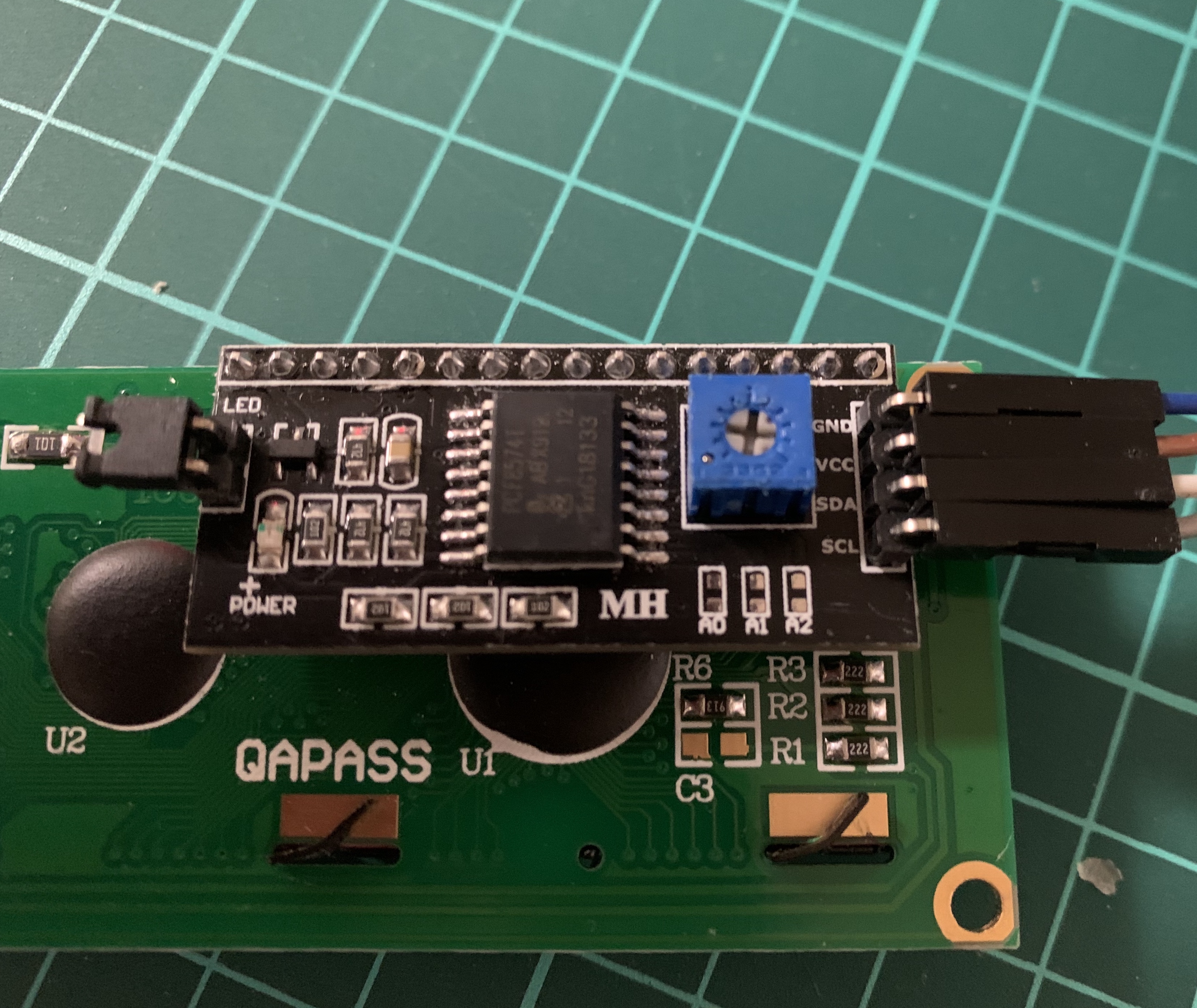
| SC1602 | PCF8574T |
| D7 | P7 |
| D6 | P6 |
| D5 | P5 |
| D4 | P4 |
| LED | P3 |
| E | P2 |
| RW | P1 |
| PS | P0 |
SC1602のコントロールIC HD44780(互換)の制御線は、4bitモードの場合7本必要になります。SC1602は4bitモードで動作させないといけませんね。残りの1本はバックライトLED ON/OFF用です。まぁうまいこと8本に収まりましたね。
LEDは、HD44780ではなくトランジスタに直接つながっています。1でバックライトON, 0でバックライトOFFです。
PCF8574は、1バイトのレジスタを介してデータのR/Wを行います。制御は簡単です。
PCF8574のレジスタbit 0からbit 7が、P0からP8に対応しています。レジスタに書き込むとビットに対応したポートがON/OFFします。バイトデータ送信後のACKのタイミングで各ポートが変化します。また、PCF8574にバイトデータを連続して書き込むとACKタイミング毎にポートが変化する事になります。
つまり、短いWaitであれば、バイトデータを複数回送信する事によりポートをH/Lさせるタイミングを調整することができます。この例(前回のSW_I2C のshortWait設定,STM32F103 clock 72MHzだと) 1byte(スタート、ストップは含まず)で大体43〜45μsでした。(ちょっとクロックが速すぎるみたいですね。waitを調整した方が良いですね。とりあえず、実力的には動作しているようですが…)
ReturnHomeのコマンド以外は1byte送信する時間でwaitが間に合いそうですね。
先のSW_I2Cクラスを継承してSC1602_I2Cクラスを作る事にします。
使っていないもの、実装していないものもありますが、そこはご愛嬌。
/*
 * sc1602_i2c.h
 *
 *  Created on: 2019/10/14
 *      Author: https://www.e-momonga.com/honkytonk
 *      Copyright 2019 honkytonk. All right reserved.
 */

#ifndef INC_SC1602_I2C_H_
#define INC_SC1602_I2C_H_

#include <stdint.h>
#include "sw_i2c.h"
#include "sc1602_fonts.h"

typedef struct {
	uint8_t line;
	uint8_t column;
	uint8_t command;
	uint8_t message[16*2+2];
}sc1602_message_t;

#define SC1602_COMMAND_NONE 0
#define SC1602_COMMAND_CLEAR_DISPLAY 	1
#define SC1602_COMMAND_CURSOR_OFF		2
#define SC1602_COMMAND_CURSOR_ON		4
#define SC1602_COMMAND_CURSOR_BLINK		8

#define SC1602_CLEAR_DISPLAY 	0x01
#define SC1602_RETURN_HOME		0x02
#define SC1602_FUNCTION_SET		0x20
#define SC1602_DISPLAY_ON_OFF	0x08

#define SC1602_ACP_DISPLAY_SHIFT	0x01
#define SC1602_DISPLAY_SHIFT	(0x01 << 3)
#define SC1602_CURSOR_ON		(0x01 << 1)
#define SC1602_DISPLAY_ON		0x04
#define SC1602_BLINK_CURSOR		0x01
#define SC1602_8_BITS_WIDTH		(0x01 << 4)
#define SC1602_4_BITS_WIDTH		(0x00 << 4)
#define SC1602_DISPLAY_2_LINE	(0x01 << 3)
#define SC1602_DISPLAY_1_LINE	(0x00 << 3)
#define SC1602_5x10_DOTS_FONT	(0x01 << 2)
#define SC1602_5x8_DOTS_FONT	(0x00 << 2)
#define SC1602_BUSY_FLAG		(0x01 << 7)
#define SC1602_INCREMENT		(0x01 << 1)
#define SC1602_NONE				0x00
#define SC1602_SET_DDR_ADDRESS	0x80

#define SC1602_D7	0x80
#define SC1602_D6	0x40
#define SC1602_D5	0x20
#define SC1602_D4	0x10
#define SC1602_LED	0x08
#define SC1602_E	0x04
#define SC1602_RW	0x02
#define SC1602_R	0x02
#define SC1602_W	0x00
#define SC1602_RS	0x01

#define SC1602_MAX_COLUMN 16
#define SC1602_MAX_LINES 2


#ifdef __cplusplus

class SC1602_I2C : SW_I2C {
private:
	bool ledSw;

public:
	SC1602_I2C(uint8_t slave, gpio sda, gpio scl): SW_I2C(slave, sda, scl){ this->ledSw = true;}

	void clearDisplay(void);
	void returnHome(void);
	void sendInstruction(uint8_t command);
	void sendData(uint8_t command);
	void writeDataRam(const uint8_t *c);
	void setCGRamAddress(uint8_t address);
	void setDDRamAddress(uint8_t address);
	void setFunction(void);
	void setDisplayOnOff(bool area, bool cursor, bool blink);
	void displayString(uint8_t *str);
	void putChar(const uint8_t c){this->writeDataRam(&c);};
	void setCursorPosition(uint8_t line, uint8_t column);
	bool isBusy(void);
	void initialize(void);
	void ledOnOff(bool ledOnOff){this->ledSw = ledOnOff ? true: false;}
	bool isLedOn(void){return this->ledSw;}
	uint8_t getAddressCounterAndBF(void);
	uint8_t getCurrentAddress(void);
	void setCGFont(uint8_t addres, const uint8_t *font);
	void setCustomFont(void)
	{
		for(uint8_t i = 0; i < 8; i++){
			this->setCGFont(i, &font[i][0]);
		}
	}
};

#endif
#endif /* INC_SC1602_I2C_H_ */
メンバー関数は以下の通りです。
- HD44780には、スクロールの機能も有るようですが、使わないので実装していません。
- カスタムフォント(CG)のロードは、setCGFont(), setCustomFont()で行います。フォントデータを別ファイルにして、initialize()で初期化後にロードします。
- setCursorPosition()で入力位置を設定した後、displayString()で文字を表示します。文字列はnull終端です。もし、カスタムフォントの0x00を表示する場合は、エイリアスの0x08を指定してください。
- 一文字表示はputChar()でも可能です。
- コマンド等、HD47780の処理に時間がかかる場合は、isBusy()がtrueの間waitするようにしてください。
例では、initialize()の最後でclearDisplay()の後にbusyフラグをチェックしています。1ループ分ぐらいbusyになっているようです。(スペック1.52ms HD47780の仕様なので、互換ICでは若干異なるかもしれませんね)
/*
 * sc1602_i2c.cpp
 *
 *  Created on: 2019/10/23
 *      Author: https://www.e-momonga.com/honkytonk
 *      Copyright 2019 honkytonk. All right reserved.
 */

#include "sc1602_i2c.h"
#include "cmsis_os.h"

#ifdef __cplusplus
extern "C" {
#endif

int tiny_printf( const char *format, ... );

#ifdef __cplusplus
};
#endif

	void SC1602_I2C::initialize(void)
	{
		uint8_t data[3];
		uint8_t led = (this->isLedOn()) ? SC1602_LED: SC1602_NONE;

		data[0] = led | 0x00;

		//-- send function set 3 times -- 8 bit width//
		data[1] = led | SC1602_E | (0x03 << 4);
		data[2] = data[1] & ~SC1602_E;

		this->writeBytes(this->getSlaveAddress(), data, 3);
		osDelay(5); // wait more than 4.1ms
		this->writeBytes(this->getSlaveAddress(), data, 3);
		osDelay(1); // wait more than 100us
		this->writeBytes(this->getSlaveAddress(), data, 3);
		osDelay(1);

		//-- send function set -- 4 bit width//
		data[1] = led | SC1602_E | (0x02 << 4); //
		data[2] = data[1] & ~SC1602_E;
		this->writeBytes(this->getSlaveAddress(), data, 3);

		this->setFunction(); // 4bit width, 2 lines, 5x8 dots font
		this->setDisplayOnOff(true, true, false);
		this->clearDisplay();

		while(this->isBusy()){
			osDelay(1);
		}

	}


	void SC1602_I2C::clearDisplay(void)
	{
		uint8_t data;

		data = SC1602_CLEAR_DISPLAY;
		this->sendInstruction(data);
	}

	void SC1602_I2C::sendInstruction(uint8_t command)
	{
		uint8_t led = (this->isLedOn()) ? SC1602_LED: SC1602_NONE;

		uint8_t data[8];
		data[0] = led | (command & 0xf0);		//RS = 0, R/W = W, E = 0, D4-D7 <- data(D4-D7)
		data[1] = data[0] |SC1602_E;			//RS = 0, R/W = W, E = 1, D4-D7 <- data(D4-D7)
		data[2] = data[1] & ~SC1602_E;			//RS = 0, R/W = W, E = 0, D4-D7 <- data(D4-D7)
		data[3] = data[2];						//RS = 0, R/W = W, E = 0, D4-D7 <- data(D4-D7)
		data[4] = led | ((command & 0x0f)<<4);	//RS = 0, R/W = W, E = 0, D4-D7 <- data(D0-D3)
		data[5] = data[4] | SC1602_E;			//RS = 0, R/W = W, E = 1, D4-D7 <- data(D0-D3)
		data[6] = data[5] & ~SC1602_E;			//RS = 0, R/W = W, E = 0, D4-D7 <- data(D0-D3)
		data[7] = data[6];						//RS = 0, R/W = W, E = 0, D4-D7 <- data(D0-D3)
		this->writeBytes(this->getSlaveAddress(), data, 8);
	}

	void SC1602_I2C::sendData(uint8_t command)
	{
		uint8_t led = (this->isLedOn()) ? SC1602_LED: SC1602_NONE;

		uint8_t data[8];

		data[0] = led | SC1602_RS | (command & 0xf0);					// RS = 1, R/W = W, E = 0, D4-D7 <- command(D4-D7)
		data[1] = data[0]| SC1602_E;									// RS = 1, R/W = W, E = 1, D4-D7 <- command(D4-D7)
		data[2] = data[1] & ~SC1602_E;									// RS = 1, R/W = W, E = 0, D4-D7 <- command(D4-D7)
		data[3] = data[2];												// RS = 1, R/W = W, E = 0, D4-D7 <- command(D4-D7)
		data[4] = led | SC1602_RS | ((command & 0x0f)<<4);				// RS = 1, R/W = W, E = 0, D4-D7 <- command(D0-D3)
		data[5] = data[4]| SC1602_E;									// RS = 1, R/W = W, E = 1, D4-D7 <- command(D0-D3)
		data[6] = data[5] & ~SC1602_E;									// RS = 1, R/W = W, E = 0, D4-D7 <- command(D0-D3)
		data[7] = data[6];												// RS = 1, R/W = W, E = 0, D4-D7 <- command(D0-D3)
		this->writeBytes(this->getSlaveAddress(), data, 8);
	}

	void SC1602_I2C::setCGRamAddress(uint8_t address)
	{
		uint8_t data;

		address &= 0x3f;

		data = (address | 0x40);
		this->sendInstruction(data);
	}

	#define SC1602_FONT_LINE_MAX 8

	void SC1602_I2C::setCGFont(uint8_t address, const uint8_t *font)
	{
		if(address > 8) address = 8;

		this->setCGRamAddress(address << 3);

		for(uint8_t i = 0; i < SC1602_FONT_LINE_MAX; i++){
			this->writeDataRam(font + i);
		}
	}

	void SC1602_I2C::setDDRamAddress(uint8_t address)
	{
		uint8_t data;
		data = 0;

		data = SC1602_SET_DDR_ADDRESS | (address & 0x7f);
		this->sendInstruction(data);
	}

	void SC1602_I2C::setFunction()
	{
		uint8_t data;

		data = 0x20 | SC1602_4_BITS_WIDTH | SC1602_DISPLAY_2_LINE |  SC1602_5x8_DOTS_FONT;
		this->sendInstruction(data);
	}

	void SC1602_I2C::setDisplayOnOff(bool on, bool cursor, bool blink)
	{
		uint8_t data;

		data = SC1602_DISPLAY_ON_OFF;
		on ? (data |= SC1602_DISPLAY_ON) : (data &= ~SC1602_DISPLAY_ON);	// entire display on/off
		cursor ? (data |= SC1602_CURSOR_ON) : (data &= ~SC1602_NONE);		// cursor on/off
		blink ? (data |= SC1602_BLINK_CURSOR) : (data &= ~SC1602_NONE);		// blink cursor on/off

		this->sendInstruction(data);
	}

	void SC1602_I2C::returnHome()
	{
		this->sendInstruction(SC1602_RETURN_HOME);
	}

	void SC1602_I2C::displayString(uint8_t *str)
	{
		uint8_t i;
		uint8_t c;
		bool loop;

		uint8_t adrs;

		i = 0;
		loop = true;

		while(loop){
			c = str[i++];

			switch(c){
			case 0x00:
				loop = false;
				break;

			case '\n':
				adrs = this->getCurrentAddress();
				if(adrs < 0x10){
					this->setCursorPosition(1, 0);
				}
				break;

			default:
				this->putChar(c);
			}
			// i++;
		}
	}

	void SC1602_I2C::writeDataRam(const uint8_t *c)
	{
		uint8_t data[3];
		uint8_t led = (this->isLedOn()) ? SC1602_LED: SC1602_NONE;

		data[0] = led | SC1602_RS | SC1602_W | (*c & 0xf0);
		data[1] = data[0] | SC1602_E;
		data[2] = data[1] & ~SC1602_E;
		this->writeBytes(this->getSlaveAddress(), data, 3);
		this->writeBytes(this->getSlaveAddress(), &data[2], 1);

		data[0] = led | SC1602_RS | SC1602_W | ((*c & 0x0f)<<4);
		data[1] = data[0] | SC1602_E;
		data[2] = data[1] & ~SC1602_E;
		this->writeBytes(this->getSlaveAddress(), data, 3);
		this->writeBytes(this->getSlaveAddress(), &data[2], 1);
	}

	void SC1602_I2C::setCursorPosition(uint8_t line, uint8_t column)
	{

		uint8_t data;

		if(line > 2) line = 1;
		if(column > 16) column = 15;

		data = line ? 0x40 : 0x00;
		data += column;

		this->setDDRamAddress(data);
	}

	bool SC1602_I2C::isBusy( )
	{
		uint8_t ret;

		ret = this->getAddressCounterAndBF();

//		return (ret & 0x80) ? tiny_printf("I'm busy now!\n"), true: false;
		return (ret & 0x80) ? true: false;
	}

	uint8_t SC1602_I2C::getCurrentAddress()
	{
		return (this->getAddressCounterAndBF() & 0x7f);
	}

	uint8_t SC1602_I2C::getAddressCounterAndBF( )
	{
		uint8_t data[2];
		uint8_t rdata;

		uint8_t led = (this->isLedOn()) ? SC1602_LED: SC1602_NONE;

		//-- High Nibble ---
		data[0] = led | 0xf0 | SC1602_R ; 						// RS = 0, R/W = R, E = 1, data = 0xf0
		this->writeBytes(this->getSlaveAddress(), data, 1);

		data[1] = data[0] | SC1602_E; 							// RS = 0, R/W = R, E = 1, data = 0xf0
		this->writeBytes(this->getSlaveAddress(), &data[1], 1);
		this->writeBytes(this->getSlaveAddress(), &data[1], 1); // send again to wait tDDR 160ns

		this->readBytes(this->getSlaveAddress(), &rdata, 1);	// Read Busy Flag and AC address

		data[0] = (led | 0xf0 | SC1602_R) & ~SC1602_E ; 		// RS = 0, R/W = R, E = 0, data = 0xf0
		this->writeBytes(this->getSlaveAddress(), data, 1);

		//--- Low Nibble --//
		data[0] = led | 0xf0 | SC1602_R | SC1602_E; 			// RS = 0, R/W = R, E = 1, data = 0xf0
		this->writeBytes(this->getSlaveAddress(), data, 1);
		this->writeBytes(this->getSlaveAddress(), data, 1);		// send again to wait tDDR 160ns

		this->readBytes(this->getSlaveAddress(), data, 1);		// Read Busy Flag and AC address
		rdata = (rdata & 0xf0) | ((data[0] & 0xf0) >> 4);

		data[0] = (led | 0xf0 | SC1602_R) & ~SC1602_E ; 		// RS = 0, R/W = R, E = 0, data = 0xf0
		this->writeBytes(this->getSlaveAddress(), data, 1);
		this->writeBytes(this->getSlaveAddress(), data, 1);

		return rdata;
	}
custom fontの例です。「℃」を作ったつもりです。8バイトで1文字です。1バイトで1ラインです。8バイト目はカーソル用ですので、基本的にはブランク(all 0)です。
initialize()後に、setCustomFont()で一気にCGRamにロードします。ちゃんと8文字分作ってくださいね。
/*
 * sc1602_fonts.h
 *
 *  Created on: 2019/10/23
 *      Author: https://www.e-momonga.com/honkytonk
 *      Copyright 2019 honkytonk. All right reserved.
 */

#ifndef INC_SC1602_FONTS_H_
#define INC_SC1602_FONTS_H_

	const uint8_t font[][8] = {
		{	// 0
			0b00011000,
			0b00011000,
			0b00000111,
			0b00001000,
			0b00001000,
			0b00001000,
			0b00000111,
			0b00000000,
						},
    --- 省略 ---
	};

#endif /* INC_SC1602_FONTS_H_ */
SC1602_I2Cクラスの使い方です。FreeRTOS(CMSIS-RTOS)のTaskにしています。
初期化完了後は、別のタスクからMailで送られた文字を受け取って表示しています。
/*
 * task_sc1602.cpp
 *
 *  Created on: Jul 11, 2019
 *      Author: https://www.e-momonga.com/honkytonk
 *      Copyright 2019 honkytonk. All right reserved.
 */

#include "main.h"
#include "task_sc1602.h"
#include "sc1602_i2c.h"
#include "cmsis_os.h"

osMailQId SC1602MailHandle;
osMailQDef(SC1602Mail, 8, sc1602_message_t);

void TaskSc1602(void const * argument)
{

	class SC1602_I2C sc1602((0x27 << 1), {SDA_GPIO_Port, SDA_Pin}, {SCL_GPIO_Port, SCL_Pin});
	SC1602MailHandle = osMailCreate(osMailQ(SC1602Mail), NULL);

	osDelay(50);

	sc1602.initialize();
	sc1602.setCustomFont();

	sc1602.setCursorPosition(0, 1);
	uint8_t str[] = "SC1602+BME280\n  by honkytonk";
	sc1602.displayString(str);

	while(1){
		osEvent event = osMailGet(SC1602MailHandle, osWaitForever);
		if(event.status == osEventMail){
			sc1602_message_t *message = (sc1602_message_t*)event.value.p;

			if(message->command == SC1602_COMMAND_CLEAR_DISPLAY){
				osDelay(1000);
				sc1602.clearDisplay();
				osDelay(1000);
			}
			else if(message->command == SC1602_COMMAND_CURSOR_OFF){
				sc1602.setDisplayOnOff(true, false, false);
				osDelay(100);
			}
			else if(message->command == SC1602_COMMAND_CURSOR_ON){
				sc1602.setDisplayOnOff(true, true, false);
				osDelay(100);
			}
			else if(message->command == SC1602_COMMAND_CURSOR_BLINK){
				sc1602.setDisplayOnOff(true, true, true);
				osDelay(100);
			}

			sc1602.setCursorPosition(message->line, message->column);
			sc1602.displayString(message->message);

			osMailFree(SC1602MailHandle, message);
		}
		osDelay(10);
	}
}